No products in the cart.
Comprehensive Guide to Data Recovery Solutions
Understanding Data Recovery
Data recovery is the process of retrieving lost, deleted, or inaccessible data from various storage devices, such as hard drives, SSDs, CDs, DVDs, and USB flash drives. The importance of data recovery cannot be overstated, as data loss can happen due to multiple reasons, including accidental deletion, hardware failure, corruption, or devastating situations like natural disasters. For both individuals and businesses, losing vital information can have serious implications, leading to financial losses, reputation damage, and loss of valuable time.
Common scenarios where data recovery becomes necessary include instances of unintentional file deletion, system crashes, viruses or malware attacks, and physical damage to storage devices. For personal users, losing cherished photos or important documents can be distressing, while for businesses, the stakes are much higher, as crucial business records, customer information, and operational data are often at risk. The inability to access this data can lead not only to operational hiccups but also to the potential for regulatory breaches and legal consequences.
In today’s digital age, effective data recovery solutions are essential for safeguarding both personal and professional data. Individuals frequently employ recovery software or seek professional services to restore lost files. Businesses, on the other hand, often implement comprehensive data recovery plans and backup systems to mitigate the risk of data loss. In summary, understanding the fundamental concept of data recovery, its significance, and common scenarios is essential in today’s technology-driven environment, enabling individuals and organizations to proactively manage their data security and integrity.
Common Causes of Data Loss
Data loss can occur for a variety of reasons, often leading to significant distress and potential financial loss for individuals and organizations alike. Understanding the common causes of data loss is crucial for implementing effective data recovery solutions and preventive measures.
One of the most frequent causes of data loss is accidental deletion. Users may unintentionally delete files while cleaning up storage or may mistakenly overwrite existing data with new files. This type of data loss can often be circumvented with proper file management practices and regular backups, allowing users to recover lost files with relative ease.
Hardware failures also contribute significantly to data loss incidents. This includes issues such as hard disk drive (HDD) failures, which can result from mechanical wear and tear over time, leading to catastrophic data loss. Solid-state drives (SSDs), while generally more reliable, can also face corruption or firmware issues that jeopardize stored data. In both cases, understanding the signs of impending hardware failure can allow users to take preventive action before total data loss occurs.
Furthermore, storage media problems, such as those associated with SD cards and USB drives, can also result in data loss. These devices are susceptible to physical damage, which can disrupt data storage and access. Additionally, improper ejection of these devices without safe removal can lead to file system corruption. Users should maintain best practices for handling and storing these devices to mitigate risks.
Other causes of data loss can include malware infections, which can destroy or encrypt files preventing access, or natural disasters that physically damage hardware. Understanding these diverse risks is fundamental to safeguarding important data. By being aware of and identifying the potential situations that lead to data loss, individuals and businesses can better prepare themselves and implement appropriate data recovery solutions when necessary.
How Data Recovery Works
Data recovery is a crucial process employed to restore lost, corrupted, or deleted data from various storage devices, such as hard drives, SSDs, USB drives, and memory cards. The process itself can be complex and involves several techniques and methodologies designed to efficiently retrieve data while minimizing potential further damage to the storage medium.
The first step in the data recovery process is an initial assessment where technicians diagnose the cause of data loss. This stage may involve analyzing the storage device to identify issues such as physical damage, logical corruption, or accidental deletion. Understanding the root cause is essential as it determines the approach taken for recovery.
Once the assessment is complete, data recovery specialists employ various techniques to retrieve the lost information. Logical recovery techniques are commonly used when the data loss results from software-related issues. This can involve utilizing specialized data recovery software that scans the file system for recoverable files and attempts to restore them. Depending on the sophistication of the software, it can recover data from formatted drives or even partitions that have been deleted.
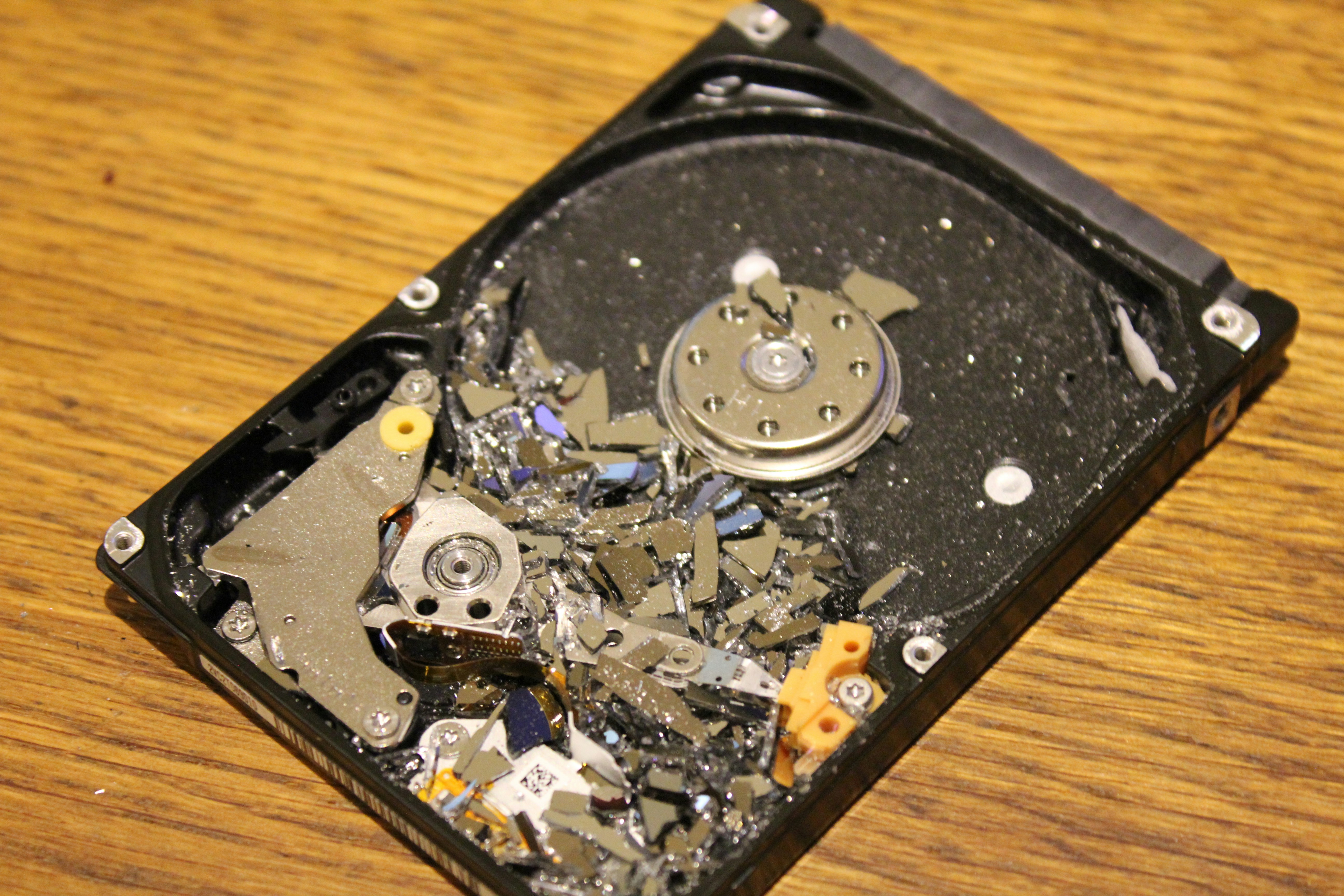
For more serious cases where physical damage is present, hardware solutions are necessary. This phase typically requires a cleanroom environment, where teams can open the storage device without exposing it to contaminants. They may replace faulty components, such as read/write heads, or clone the damaged drive to another functional unit to perform a recovery. By carefully implementing these hardware-based recovery methods, technicians can often salvage data that software solutions cannot access.
Regardless of the technique used, the final stage of data recovery involves verifying the integrity and completeness of the retrieved files. Technicians ensure that the restored data is usable and intact, enabling clients to regain access to their essential information. Overall, the data recovery process is a meticulous effort to recover valuable data while adhering to best practices to prevent further loss.
Recovery from Deleted Photos
Photo recovery can often be a stressful situation for individuals who inadvertently delete pictures from their devices. There are various methods used to recover erased images, and these can be broadly categorized into DIY strategies and the employment of professional services.
For those inclined to attempt the recovery independently, there are several software options available in the market that are designed specifically for recovering deleted photos. These software tools typically operate by scanning the storage medium for traces of deleted files, attempting to reconstruct them based on residual data. Users must ensure that they act swiftly after deletion, as continued use of the device may overwrite the deleted data, reducing the chances of a successful recovery.
Additionally, it is essential to consider the type of storage device involved in the photo recovery process. Different devices, whether they be digital cameras, smartphones, or memory cards, may require specific recovery approaches or software tailored to their unique file systems. For instance, recovering photos from a smartphone may involve different steps compared to a computer’s hard drive. Factors such as the operating system, file format, and age of the device can significantly influence recovery success rates.
On the other hand, if the DIY methods do not yield satisfactory results, seeking professional photo recovery services can be a viable alternative. These services often possess advanced technology and expertise that can significantly enhance the likelihood of retrieving lost photos. However, it is wise to research and select a reputable company, as the quality and effectiveness of service vary widely in this field.
When weighing the options for photo recovery, whether choosing a DIY approach or enlisting professional help, users must remain mindful of the potential risks and benefits associated with each method. Proper understanding and preparation can greatly impact the outcome of the recovery process.
Handling Failed Hard Drives
Recovering data from a malfunctioning hard drive is a critical process that requires careful handling and understanding of the signs indicating a failure. A hard drive may exhibit various symptoms that suggest pending failure, such as unusual noises, frequent crashes, or slow performance. Noticing these signs early can be crucial in preventing total data loss.
One of the primary indicators of a failing hard drive is the presence of unusual sounds, such as clicking or grinding noises. These sounds can be symptomatic of mechanical issues within the drive. Similarly, if your system frequently experiences errors such as “blue screen of death,” or if files become corrupted, these too are warning signs that the hard drive may be on the verge of failure.
If you suspect that your hard drive is failing, it is advisable to stop using it immediately. Continuing to write data to a malfunctioning drive can exacerbate the problem and reduce the chances of successful recovery. Instead, consider creating a backup of your data, if you can still access it. Tools like data recovery software can also be used to recover files from a failing hard drive, though these should be employed with caution to avoid further damage.
In cases where the data is extremely important and the issues are beyond simple troubleshooting, seeking professional help is crucial. Data recovery specialists have the tools and expertise necessary to retrieve data from severely damaged drives. They can often recover lost data by repairing the hard drive in a controlled environment, which is typically not feasible for the average user.
Ultimately, understanding how to handle failed hard drives can mean the difference between total loss and successful data recovery. It is essential to recognize the signs of failure early, cease operations on the drive, and utilize professional services when necessary to secure your data with minimal risk.
Dealing with Corrupted SD Cards and USB Drives
Data corruption on storage devices such as SD cards and USB drives can occur due to a variety of reasons, wreaking havoc on the data stored within. One of the most common issues arises from improper disconnection. For instance, abruptly removing an SD card or USB drive without safely ejecting it can lead to corruption of the file system. Furthermore, power failures during data transfer processes can result in incomplete files, making them unusable.
Another frequent issue comes from physical damage. Exposure to water, extremes of temperature, or accidental impact can compromise the integrity of storage devices. Additionally, using the same SD card or USB drive across various devices and systems can sometimes introduce compatibility issues, leading to data corruption. In some cases, malware or viruses can infiltrate the devices, corrupting files and posing significant risks to data integrity.
To recover data from corrupted SD cards and USB drives, users can first attempt to reconnect the device to the computer to see if it is detectable. Once connected, using built-in recovery tools such as Windows’ CHKDSK or third-party software may help restore access to lost files. However, it is crucial to avoid writing new data to the corrupted device, as this can overwrite existing files and reduce chances of successful recovery.
To minimize the risk of future data corruption, users should adopt preventative measures. Regularly backing up important files to multiple storage locations can provide an extra layer of security. Additionally, safely ejecting devices before removal should become a habitual practice. Users are also advised to format SD cards and USB drives periodically to maintain optimal performance. Using high-quality storage devices from reputable manufacturers can significantly reduce the risk of data corruption.
Data Recovery for SSDs
Retrieving data from solid-state drives (SSDs) presents unique challenges compared to traditional hard drives (HDDs). While both drive types store data digitally, their structural and operational differences impact data recovery processes significantly. Understanding these nuances is essential for effective data recovery methods when dealing with SSDs.
One of the primary differences between SSDs and HDDs lies in their respective technologies. SSDs use NAND flash memory for storage, which allows for faster data access speeds, reduced latency, and greater shock resistance. However, this flash memory is designed to manage how data is written and erased, commonly using a feature called TRIM. TRIM improves performance and longevity of the SSD by clearing deleted data and marking it as available for future use. Unfortunately, this means that once data is deleted, it may not be recoverable, posing a significant challenge in recovery scenarios.
In contrast, traditional hard drives physically store data on magnetic disks, and deleted data can often be recovered until it is overwritten. This major distinction means that the recovery process for SSDs typically requires specialized techniques and tools tailored for solid-state technology.
Successful recovery from SSDs often involves professional intervention. Methods such as forensic recovery and the use of specialized software are generally employed to minimize the risk of permanent data loss. Thorough diagnostics are critical in determining the nature of the failure, and understanding whether physical or logical issues are at play can guide the recovery efforts.
In addition, users need to be aware of the importance of regular data backups. SSDs, while generally reliable, are not immune to failure. Implementing a robust backup strategy can ensure that important data is always recoverable, regardless of any potential data loss scenarios. Awareness of the differences in recovery practices between SSDs and traditional hard drives will better equip users to handle data loss situations effectively.
RAID and NAS Data Recovery Techniques
Data recovery in RAID (Redundant Array of Independent Disks) and NAS (Network Attached Storage) environments presents unique challenges and methodologies. These systems are designed for data redundancy and high availability, yet they are not immune to failures. Understanding the intricacies of data recovery from these configurations is crucial for both administrators and end-users.
RAID arrays distribute data across multiple drives to improve reliability and performance. However, various types of RAID levels, such as RAID 0, RAID 1, RAID 5, and RAID 10, handle data differently. For instance, while RAID 0 offers no redundancy, making it highly vulnerable to data loss if a single drive fails, RAID 1 duplicates the same data on two drives, allowing for failover. Understanding these distinctions is essential for determining the approach for recovery. Common failure scenarios include drive malfunctions, accidental deletions, and corruption due to power failures or software issues.
Network Attached Storage systems, on the other hand, provide data access over a network, combining several disk drives into a consolidated storage solution. NAS devices often utilize RAID setups internally to prevent data loss and ensure continuous operation. Recovery techniques for NAS can vary considerably based on the configuration and the nature of the failure. For instance, if a single drive in a RAID 5 configuration fails, the data can often be reconstructed by utilizing the parity data stored across the remaining drives. However, in the event of multiple failures, more advanced techniques, such as using specialized software or involving professional data recovery services, may be required.
The first step in any recovery process involves assessing the situation, identifying the RAID level, and analyzing the extent of the damage. From there, the recovery procedure may involve replacing faulty drives, reconfiguring the RAID setup, and potentially utilizing data recovery software designed for RAID and NAS systems. It is essential to approach recovery carefully, as incorrect methods can lead to further data loss.
In conclusion, the complexities of data recovery in RAID and NAS environments necessitate a comprehensive understanding of their architecture and potential failure scenarios. Effective recovery often requires precise steps adapted to the specific configuration and circumstances surrounding the data loss.
Choosing the Right Data Recovery Service
When faced with data loss, selecting the right data recovery service is paramount to restoring your lost information effectively. The overwhelming number of options available can make this decision daunting; however, focusing on a few critical factors can streamline your search.
First, consider the experience and expertise of the data recovery service. Look for companies that have been in business for several years and specialize in the type of data loss you are experiencing, whether it’s from hard drives, RAID systems, or SSDs. A reputable service will usually have certifications or partnerships with recognized technology providers, underlining their technical proficiency.
Next, customer reviews are an essential aspect to evaluate when choosing a data recovery service. Modern consumers often share their experiences online, providing insights into the service’s reliability. Pay attention to both positive and negative reviews to gauge overall customer satisfaction. Additionally, seek out testimonials or case studies on the company’s website, which can offer further evidence of their successful recovery methods.
It is crucial to communicate directly with potential recovery specialists and prepare a list of key questions. Ask about their success rates, types of recovery methods they utilize, and their handling of sensitive data. It’s also vital to inquire about their pricing structure: is it a flat fee or does it depend on the complexity of the recovery? Understanding the costs upfront can help avoid any surprises later on.
Lastly, ensure the service has robust data protection policies in place to safeguard your information during the recovery process. A trustworthy company should be transparent about their privacy protocols and demonstrate a commitment to protecting client data.
By taking the time to assess these elements, you can confidently select a reputable data recovery service that meets your needs while maximizing the potential for successful data restoration.